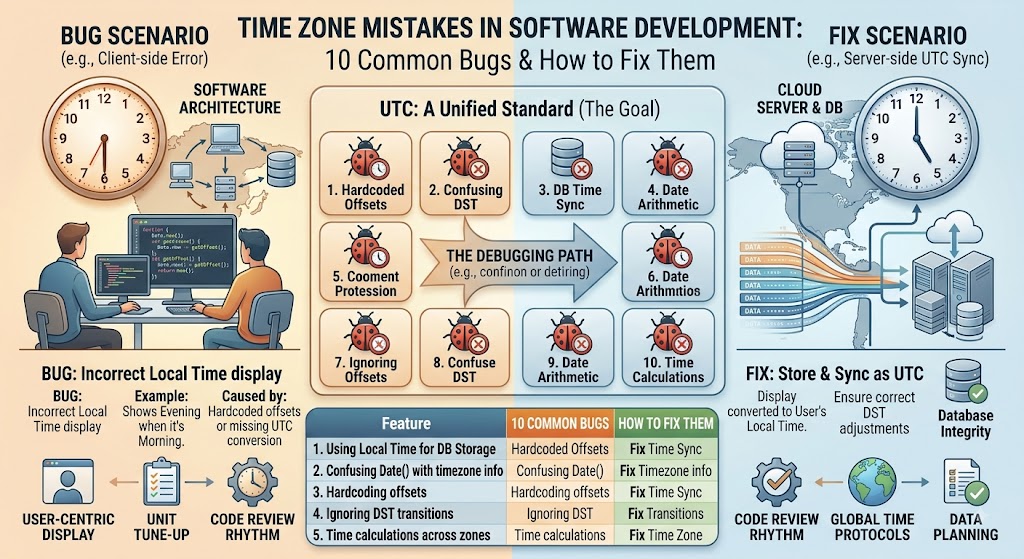
Time Zone Mistakes in Software Development: 10 Common Bugs and How to Fix Them
It's 2:00 AM. Your pager goes off.
"Orders are showing the wrong date!"
You check the logs. The timestamp says 2026-03-08 02:30:00 — but that time doesn't even exist in your user's time zone. It's the DST spring-forward transition.
Your code just tried to create an impossible time. Now you're debugging at 2 AM while your users are angry.
Time zones are the silent killer of software projects. They seem simple until they're not. And when they break, they break in ways that are hard to reproduce, harder to debug, and impossible to ignore.
This guide covers the 10 most common time zone mistakes I've seen in production systems — and how to fix each one.
Use the free time zone converter here →
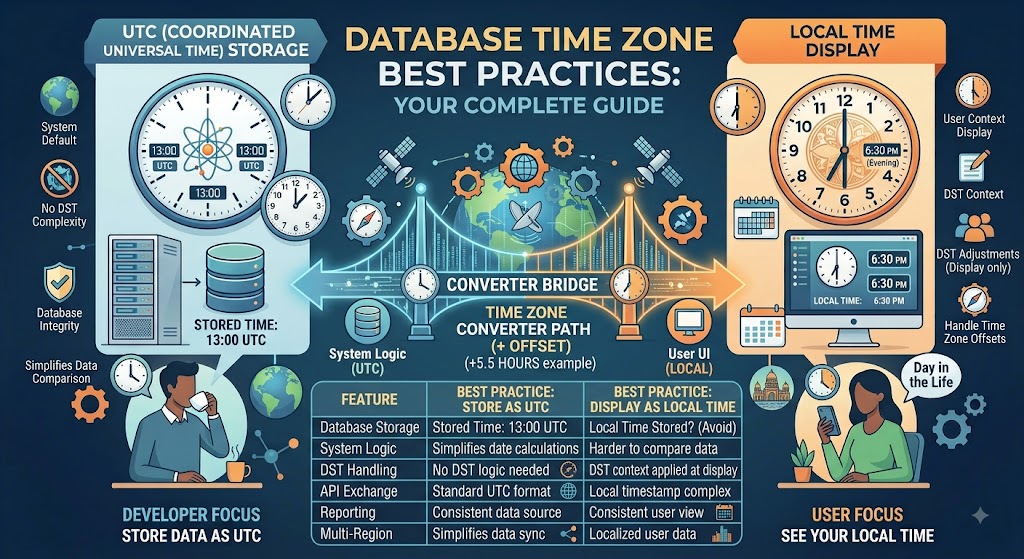
The Golden Rule of Time Zones in Code
Store UTC. Convert on display.
This one rule solves 90% of time zone bugs.
- Storage: Always store timestamps in UTC
- Logic: Always do calculations in UTC
- Display: Only convert to local time when showing to users
Exception: Calendar events and future dates may need to store the original time zone for recurring events. We'll cover that later.
Mistake #1: Storing Local Time in the Database
The Problem
// WRONG
const localTime = new Date(); // Gets local time
await db.save({ created_at: localTime });
This stores the server's local time. If your server is in New York and your user is in Tokyo, the timestamp is meaningless.
What Happens
- Server moves to a different time zone → all timestamps shift
- User in different time zone sees wrong times
- Sorting by date becomes incorrect
- Backups have inconsistent timestamps
The Fix
// RIGHT
const utcTime = new Date().toISOString(); // Always UTC
await db.save({ created_at: utcTime });
Or use the database's UTC function:
-- PostgreSQL
INSERT INTO orders (created_at) VALUES (NOW() AT TIME ZONE 'UTC');

-- MySQL
INSERT INTO orders (created_at) VALUES (UTC_TIMESTAMP());

-- MongoDB (already stores as UTC)
db.orders.insert({ created_at: new Date() }); // Automatically UTC
Best Practice
Always store timestamps in UTC. Period. No exceptions for timestamps.
Mistake #2: Using JavaScript's new Date() Without Timezone Context
The Problem
// WRONG
const date = new Date('2026-08-10T14:00:00');
console.log(date.getHours()); // What's this? Depends on your machine
JavaScript's Date object is notoriously confusing. It stores time in UTC but displays in local time. This leads to subtle bugs.
What Happens
- The same code produces different results on different machines
- DST transitions create invalid times
- Dates parsed from strings have different behavior across browsers
The Fix
Option 1: Use UTC methods exclusively
// GOOD - Use UTC methods
const date = new Date('2026-08-10T14:00:00Z'); // Z = UTC
console.log(date.getUTCHours()); // Always 14:00
Option 2: Use a time zone library
// BEST - Use Luxon or date-fns-tz
import { DateTime } from 'luxon';

const dt = DateTime.fromISO('2026-08-10T14:00:00', { zone: 'UTC' });
console.log(dt.setZone('America/New_York').toISO());
Option 3: Use the Temporal API (future)
// BEST (once available)
const date = Temporal.Instant.from('2026-08-10T14:00:00Z');
const nyc = date.toZonedDateTimeISO('America/New_York');
Best Practice
Use a time zone library. date-fns-tz, Luxon, or moment-timezone (if you must). Never rely on the browser's local time for backend logic.
Mistake #3: Ignoring DST Transitions
The Problem
// WRONG
const nextDay = new Date(timestamp);
nextDay.setDate(nextDay.getDate() + 1);
This adds 24 hours to the timestamp. In UTC, that's fine. But if you're working in local time, you'll hit DST transitions.
What Happens
- Spring forward: 2:00 AM doesn't exist
- Fall back: 1:00 AM happens twice
- Your date calculations are off by 1 hour
The Real Example
// March 13, 2026 (DST spring forward)
// At 2:00 AM, clocks jump to 3:00 AM

const date = new Date('2026-03-13T01:30:00Z');
// Local time might be 8:30 PM on March 12
// The next hour doesn't exist in some time zones

// WRONG: This might create an invalid time
date.setHours(date.getHours() + 1);
The Fix
Never add hours to local time. Always use UTC.
// GOOD - Add milliseconds in UTC
const MS_PER_DAY = 24 * 60 * 60 * 1000;
const nextDay = new Date(timestamp.getTime() + MS_PER_DAY);

// BETTER - Use a library
import { DateTime } from 'luxon';
const nextDay = DateTime.fromISO(timestamp, { zone: 'UTC' })
  .plus({ days: 1 });
Best Practice
All date arithmetic should be in UTC. Convert to local only for display.
Mistake #4: Storing Time as String Without Timezone
The Problem
-- WRONG
INSERT INTO events (start_time) VALUES ('2026-08-10 14:00:00');
What time zone is this in? Server local? User local? UTC? Nobody knows.
What Happens
- Time zone gets lost forever
- Different servers interpret it differently
- Users in different time zones see wrong times
- Migration becomes a nightmare
The Fix
-- GOOD - Store as TIMESTAMP WITH TIME ZONE
CREATE TABLE events (
    start_time TIMESTAMP WITH TIME ZONE
);

-- Even better - Store as UTC always
CREATE TABLE events (
    start_time TIMESTAMP WITH TIME ZONE DEFAULT (NOW() AT TIME ZONE 'UTC')
);
Database Best Practices
| Database | Best Data Type | Notes |
|---|---|---|
| PostgreSQL | TIMESTAMP WITH TIME ZONE |
Always stores as UTC internally |
| MySQL | DATETIME or TIMESTAMP |
Use UTC_TIMESTAMP() for insertion |
| MongoDB | Date() |
Always stores as UTC |
| SQLite | TEXT with ISO 8601 |
2026-08-10T14:00:00Z format |
Best Practice
Store timestamps as ISO 8601 with timezone indicator.
{
    "created_at": "2026-08-10T14:00:00Z"  // UTC
}
Mistake #5: Assuming All Time Zones Are Hour Offsets
The Problem
// WRONG
function convertTime(hours, fromOffset, toOffset) {
    return hours + (toOffset - fromOffset);
}
This fails for half-hour and 45-minute time zones.
What Happens
- India (UTC+5:30) → Your code breaks
- Nepal (UTC+5:45) → Complete chaos
- Chatham Islands (UTC+12:45) → Good luck
The Real Example
// WRONG - Assumes only hourly offsets
const diff = targetOffset - sourceOffset; // Works for EST to PST, fails for India

// RIGHT - Use IANA timezone database
const fromZone = 'America/New_York';
const toZone = 'Asia/Kolkata';
const result = DateTime.now().setZone(fromZone).setZone(toZone);
The Fix
Use IANA time zone identifiers.
// GOOD
import { DateTime } from 'luxon';

const convertTime = (dateStr, fromZone, toZone) => {
    return DateTime.fromISO(dateStr, { zone: fromZone })
        .setZone(toZone);
};

// Examples
convertTime('2026-08-10T14:00:00', 'America/New_York', 'Asia/Kolkata');
// Works correctly with +5:30 offset

convertTime('2026-08-10T14:00:00', 'America/New_York', 'Asia/Kathmandu');
// Works correctly with +5:45 offset
Best Practice
Use IANA timezone identifiers. Never use UTC offsets alone for conversion.
Common IANA identifiers:
| Region | IANA Identifier |
|---|---|
| New York | America/New_York |
| London | Europe/London |
| Bangalore | Asia/Kolkata |
| Tokyo | Asia/Tokyo |
| Sydney | Australia/Sydney |
Mistake #6: Not Testing DST Transitions
The Problem
Your tests pass in June. They fail in November. You don't know why.
What Happens
- DST transitions create invalid times
- Fall back creates duplicate times
- Spring forward creates missing times
- Your tests don't cover these edge cases
The Fix
Always test DST transitions.
import { DateTime } from 'luxon';

// Test spring forward (March 8, 2026 at 2:00 AM doesn't exist)
test('spring forward DST transition', () => {
    const dt = DateTime.fromISO('2026-03-08T01:30:00', { zone: 'America/New_York' });
    const nextHour = dt.plus({ hours: 1 });

    // At 2:00 AM, it should be 3:00 AM
    expect(nextHour.hour).toBe(3);
    expect(nextHour.minute).toBe(0);
});

// Test fall back (November 1, 2026 at 1:00 AM happens twice)
test('fall back DST transition', () => {
    const dt = DateTime.fromISO('2026-11-01T00:30:00', { zone: 'America/New_York' });
    const nextHour = dt.plus({ hours: 1 });

    // There are two 1:00 AM times (first and second occurrence)
    // Luxon handles this with the `ambiguous` parameter
    expect(nextHour.hour).toBe(1);
});
Testing Checklist
- Spring forward (March) - missing hour
- Fall back (November) - duplicate hour
- Date boundaries (midnight)
- Year boundaries (December 31 → January 1)
- Timezone boundaries (countries that change DST on different dates)
- Half-hour time zones (India, Nepal)
Best Practice
Write tests that run with different time zones.
// Set timezone for tests
process.env.TZ = 'America/New_York';

// Then test with other timezones
process.env.TZ = 'Asia/Kolkata';
Mistake #7: Hardcoding Timezone Offsets
The Problem
// WRONG
const IST_OFFSET = 330; // 5 hours 30 minutes in minutes
This breaks when timezone rules change. And they do change.
What Happens
- Countries change DST rules (many have recently)
- Time zone database updates (happens multiple times per year)
- Your hardcoded values become wrong
The Real Example
- Samoa skipped December 30, 2011 (jumped from UTC-11 to UTC+13)
- Russia has changed DST rules multiple times in the last decade
- Turkey abandoned DST permanently in 2016
The Fix
Never hardcode offsets. Use the IANA database.
// GOOD
const getOffset = (timezone) => {
    return DateTime.local().setZone(timezone).offset;
};

// Example
console.log(getOffset('Asia/Kolkata')); // 330 (5:30)
console.log(getOffset('America/New_York')); // -300 or -240 (depending on DST)
Best Practice
Always use IANA timezone data. It gets updated multiple times per year. Your library should use the latest data.
Mistake #8: Not Handling Recurring Events Correctly
The Problem
// WRONG - Store recurring event as UTC timestamp
const event = {
    start: '2026-08-10T14:00:00Z', // 10 AM New York
    recurrence: 'weekly'
};
When DST changes, the event shifts. Your user's 10 AM meeting becomes 11 AM.
What Happens
- A weekly meeting at 10 AM New York should stay at 10 AM New York
- But if you store it in UTC, it shifts when DST changes
- Your users get confused about their meeting times
The Real Example
- Meeting scheduled for 10 AM EST (UTC-5) = 15:00 UTC
- When DST starts, it becomes 10 AM EDT (UTC-4) = 14:00 UTC
- If you store the UTC time, the meeting appears at 11 AM EDT
The Fix
Store recurring events with timezone and local time.
// GOOD - Store the local time and timezone
const event = {
    start_local: '10:00:00',
    timezone: 'America/New_York',
    recurrence: 'weekly'
};

// When calculating the next occurrence
const getNextOccurrence = (event) => {
    const dt = DateTime.fromISO('2026-08-10T10:00:00', { zone: event.timezone });
    return dt.plus({ weeks: 1 });
};
Best Practices for Recurring Events
Store:
- Local time (hour, minute, second)
- Timezone (IANA identifier)
- Recurrence rule (weekly, monthly, etc.)
Do NOT store:
- UTC timestamp (it shifts with DST)
- Timezone offset (it doesn't account for DST)
Mistake #9: Incorrect API Timezone Handling
The Problem
// WRONG API Response
{
    "created_at": "2026-08-10T14:00:00-04:00",
    "message": "Order placed at 14:00"
}
Now every client has to parse and handle the timezone.
What Happens
- Clients in different time zones handle it differently
- Some APIs return UTC, others return local
- Frontend code breaks with inconsistent formats
The Fix
APIs should always return UTC.
// GOOD API Response
{
    "created_at": "2026-08-10T14:00:00Z", // UTC
    "created_at_utc": 1723302000, // Unix timestamp
    "message": "Order placed at 14:00"
}

// Even better - Provide both
{
    "created_at_utc": "2026-08-10T14:00:00Z",
    "created_at_timestamp": 1723302000,
    "created_at_local": "2026-08-10T10:00:00-04:00" // Optional
}
API Best Practices
- Always return UTC in the response
- Use ISO 8601 format with
Zfor UTC - Include the Unix timestamp as an integer (easy for calculations)
- Accept UTC timestamps from clients
- Document the timezone format in your API docs
Example API Design
{
    "data": {
        "order": {
            "id": 12345,
            "created_at": "2026-08-10T14:00:00Z",
            "updated_at": "2026-08-10T14:30:00Z",
            "delivered_at": null
        }
    }
}
Mistake #10: Not Testing with Multiple Timezones
The Problem
Your code works perfectly on your machine. Your users are all in different time zones. Half of them see bugs.
What Happens
- Tests run in UTC (CI/CD systems usually use UTC)
- Developer machines might be in different time zones
- Production environment has users in many zones
The Fix
Run tests in multiple time zones.
// Example test setup for different timezones
describe('timezone handling', () => {
    const timezones = [
        'UTC',
        'America/New_York',
        'Asia/Kolkata',
        'Australia/Sydney'
    ];

    timezones.forEach(tz => {
        test(`works with ${tz}`, () => {
            process.env.TZ = tz;
            // Run your test
        });
    });
});
Testing Checklist
| Test Type | Description |
|---|---|
| UTC tests | Always pass, easy to debug |
| EST tests | Test with US East Coast |
| PST tests | Test with US West Coast |
| IST tests | Test with India (half-hour) |
| Japan tests | Test with Asia (no DST) |
| Australia tests | Test with Southern Hemisphere (opposite DST) |
Quick Reference: Time Zone Cheat Sheet for Developers
Storage
| Data Type | Store As | Example |
|---|---|---|
| Past timestamps | UTC (ISO 8601) | 2026-08-10T14:00:00Z |
| Future timestamps | UTC + IANA timezone | 2026-08-10T14:00:00Z, America/New_York |
| Recurring events | Local time + IANA timezone | 10:00:00, America/New_York |
| Date-only | Date string (no time) | 2026-08-10 |
Libraries
| Language | Recommended Library | Notes |
|---|---|---|
| JavaScript | Luxon or date-fns-tz |
Both use IANA database |
| Python | pytz or zoneinfo |
Zoneinfo is Python 3.9+ |
| Java | java.time (JSR-310) |
Built-in, use ZonedDateTime |
| C# | TimeZoneInfo |
Use FindSystemTimeZoneById |
| Go | time package |
Use LoadLocation |
| Ruby | ActiveSupport::TimeZone |
Use Time.zone |
IANA Database Updates
Why you need updates:
- Countries change DST rules
- Time zone boundaries change
- New time zones are added
How to update:
| Library | Update Command |
|---|---|
tzdata (npm) |
npm update tzdata |
Python zoneinfo |
System package update |
Java tzdata |
JVM update |
OS tzdata |
sudo apt-get install tzdata |
Common IANA Identifiers
// Americas
'America/New_York'      // US Eastern Time
'America/Los_Angeles'   // US Pacific Time
'America/Toronto'       // Canada Eastern Time
'America/Mexico_City'   // Mexico City

// Europe
'Europe/London'         // UK
'Europe/Paris'          // France
'Europe/Moscow'         // Russia
'Europe/Istanbul'       // Turkey

// Asia
'Asia/Kolkata'          // India (UTC+5:30)
'Asia/Kathmandu'        // Nepal (UTC+5:45)
'Asia/Tokyo'            // Japan
'Asia/Shanghai'         // China

// Oceania
'Australia/Sydney'      // Australia East
'Australia/Perth'       // Australia West
'Pacific/Auckland'      // New Zealand
Frequently Asked Questions
Should I store timestamps in UTC or local time?
Always store in UTC. Only convert to local time when displaying to users.
How do I handle DST transitions?
Use a timezone library (Luxon, date-fns-tz, etc.) and test the transition dates. Never manually add hours.
What's the best way to store dates in a database?
Use TIMESTAMP WITH TIME ZONE in PostgreSQL, TIMESTAMP in MySQL (with UTC_TIMESTAMP), or Date in MongoDB (which stores as UTC).
How do I test timezone code?
Set process.env.TZ in Node.js tests, use zoneinfo in Python, and write tests for DST transition dates.
What's the Temporal API in JavaScript?
A new date/time API that fixes most of the problems with Date. It's in stage 3 and will be available in modern browsers soon.
Should I use Unix timestamps?
Unix timestamps are UTC by definition. They work well for storage but need to be converted to readable times for display.
How do I handle timezone changes in the IANA database?
Keep your timezone data updated. Most libraries update with their packages. Update your OS's tzdata package regularly.
What about user-entered times?
If a user enters a time without a timezone, ask for their timezone or assume their local time. Store both the time and the timezone.
How do I handle calendar events across timezones?
Store the original time and timezone. For recurring events, store the rule (weekly, monthly) and the timezone. Don't convert to UTC until you need to display it.
What tools help with timezone testing?
- Our timezone converter for checking conversions
moment-timezonefor debuggingdate-fns-tzfor formatting and parsingluxonfor modern date handling
Final Thoughts
Time zones in software development are deceptively complex. They seem simple — just add some hours, right? — but they're full of edge cases and hidden traps.
The good news is that most time zone bugs are preventable. The rules are straightforward:
- Store UTC. Always.
- Use IANA timezone identifiers. Never hardcode offsets.
- Use a timezone library. Never roll your own.
- Test DST transitions. They always break.
- Accept UTC from APIs. Convert on the client.
Follow these rules, and you'll avoid 90% of timezone bugs. The other 10%? Those are the ones that require experience.
Bookmark this guide for your next timezone bug. And when you need to check a timezone conversion, use our tool.
Check timezone conversions instantly → /timezone-converter
Tags: timezone mistakes in software development, common date time bugs, UTC storage best practices, DST transition bugs, JavaScript Date timezone issues, Python datetime timezone, Java time handling, database timezone storage, API timezone handling, timezone programming mistakes, developer timezone guide, date time programming best practices, timezone testing, timezone conversion bugs, software engineering timezone