How to Handle DST Transitions in Scheduled Jobs and Cron
Twice a year, daylight saving time breaks things. Clocks jump forward or backward, and scheduled jobs either run twice, skip entirely, or fire at the wrong time.
For most people, DST means adjusting a wall clock. For anyone running scheduled jobs, it means potential data corruption, duplicate charges, missed reports, and silent failures.
This guide explains what happens to scheduled jobs during DST transitions and how to handle it correctly.
Use the free time zone converter here →
The Short Answer: Why DST Breaks Scheduled Jobs
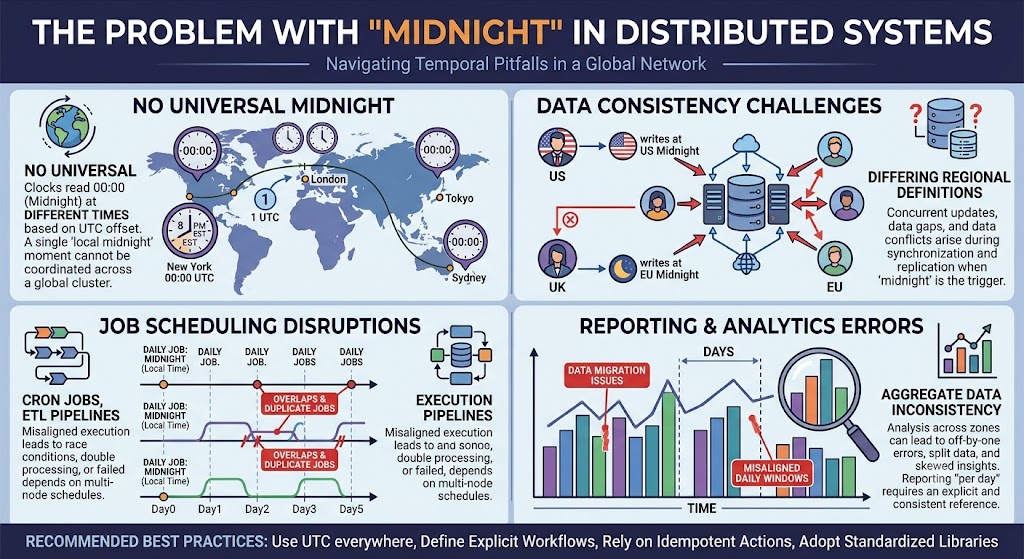
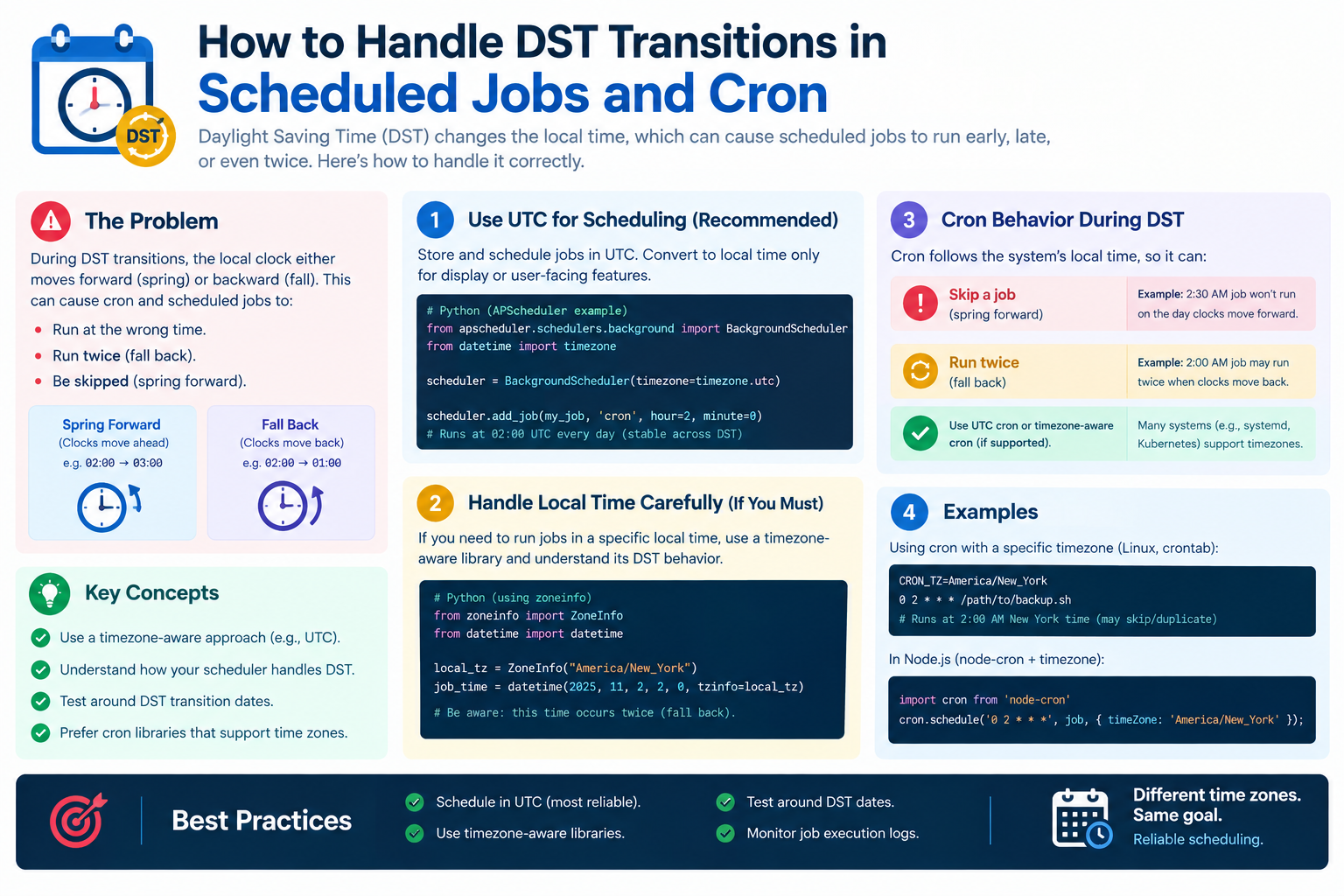
DST creates two problematic hours per year: one that does not exist and one that happens twice. Any job scheduled in local time during those windows can run incorrectly.
| Transition | Problem |
|---|---|
| Spring forward | A local hour disappears |
| Fall back | A local hour repeats |
| Local scheduling | Ambiguous or missing times |
| UTC scheduling | No ambiguity |
| Best practice | Schedule in UTC |
| When local is required | Use time zone libraries |
What Actually Happens During DST
Spring Forward: The Missing Hour
In most regions, clocks jump from 02:00 to 03:00 local time. The 02:00–03:00 hour does not exist.
| Local Time | Reality |
|---|---|
| 01:59:59 | Last second before jump |
| 02:00:00 | Skipped |
| 02:30:00 | Skipped |
| 03:00:00 | First second after jump |
Impact: A job scheduled for 02:30 local time has no valid time to run.
Fall Back: The Repeated Hour
In autumn, clocks jump from 02:00 back to 01:00 local time. The 01:00–02:00 hour happens twice.
| Local Time | Occurrence |
|---|---|
| 01:00:00 | First time (DST) |
| 01:30:00 | First time (DST) |
| 01:59:59 | First time (DST) |
| 01:00:00 | Second time (standard) |
| 01:30:00 | Second time (standard) |
Impact: A job scheduled for 01:30 local time may run twice.
How Cron Handles DST
The Core Problem
Traditional cron uses local system time. It has no awareness of DST transitions.
| Scenario | Cron Behavior |
|---|---|
| Spring forward | Jobs in the missing hour are skipped |
| Fall back | Jobs in the repeated hour run twice |
| System zone change | Cron may not reload |
| No warning | Failures are silent |
Example: Spring Forward
A job scheduled for 30 2 * * * (02:30 daily):
| Date | Behavior |
|---|---|
| Day before DST | Runs at 02:30 |
| DST day | Does not run — 02:30 does not exist |
| Day after DST | Runs at 02:30 |
Result: The job is silently skipped once a year.
Example: Fall Back
A job scheduled for 30 1 * * * (01:30 daily):
| Date | Behavior |
|---|---|
| Day before DST | Runs once at 01:30 |
| DST day | Runs twice — 01:30 occurs twice |
| Day after DST | Runs once at 01:30 |
Result: The job runs twice, potentially duplicating work.
Which Hours Are at Risk
| Region | Spring Forward | Fall Back |
|---|---|---|
| US | 02:00–03:00 | 01:00–02:00 |
| EU | 01:00–02:00 UTC | 01:00–02:00 UTC |
| Australia | 02:00–03:00 | 02:00–03:00 |
| Most regions | Early morning | Early morning |
Rule: Avoid scheduling jobs between 00:00 and 04:00 local time if you can.
Solution 1: Schedule in UTC
Why UTC Works
UTC has no DST. It never skips or repeats. A job scheduled in UTC runs exactly once, on time, every time.
| Approach | DST Safe? |
|---|---|
| Local time | No |
| UTC | Yes |
| Fixed offset | Partly |
| IANA zone | Depends on tool |
How to Set UTC in Cron
Set the system time zone to UTC, or specify UTC in the crontab.
# Set timezone for all cron jobs
CRON_TZ=UTC

# Or per job
TZ=UTC
30 2 * * * /path/to/script.sh
On some systems, you can set the time zone globally:
sudo timedatectl set-timezone UTC
The Trade-Off
| Benefit | Cost |
|---|---|
| No DST issues | Times shift in local terms |
| Predictable | Users see different local times |
| Simple | Requires time zone awareness |
Example: A job at 02:00 UTC runs at 21:00 EST in winter and 22:00 EDT in summer. The job is stable; its local appearance is not.
Solution 2: Use a Time Zone–Aware Scheduler
What to Look For
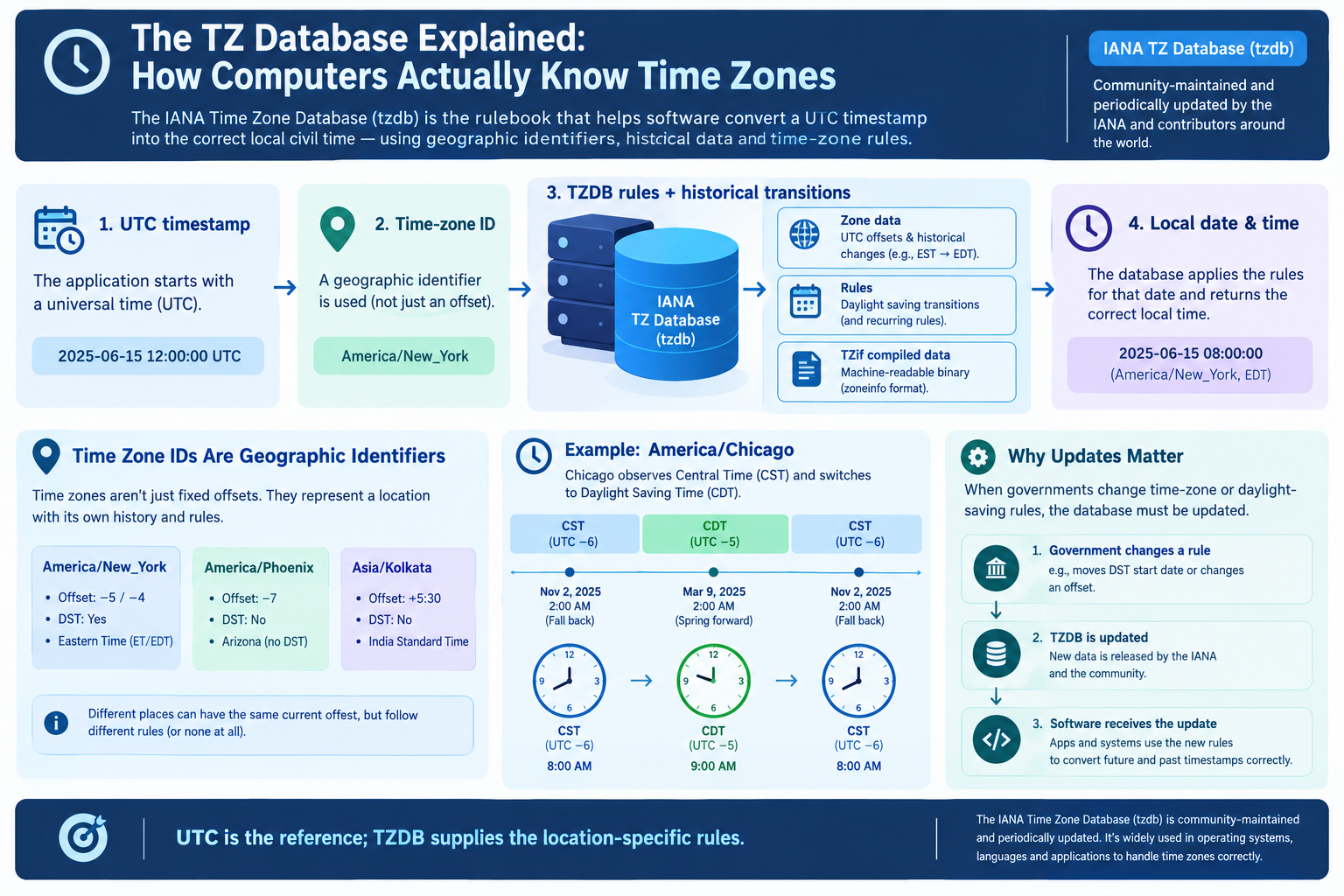
Modern schedulers understand time zones and DST.
| Feature | Why It Matters |
|---|---|
| IANA zone support | Correct DST handling |
| Skip or shift policy | What to do for missing times |
| Run-once policy | Avoid duplicates in repeated hours |
| Explicit DST rules | Predictable behavior |
Scheduler Comparison
| Scheduler | DST Handling |
|---|---|
| cron | Local time only, DST-unsafe |
| systemd timers | Supports OnCalendar with zones |
| Kubernetes CronJob | Uses UTC by default |
| Airflow | Time zone–aware |
| Celery Beat | Time zone–aware |
| Quartz | Time zone–aware with DST rules |
| APScheduler | Time zone–aware |
systemd Timers
systemd supports time zones explicitly.
[Timer]
OnCalendar=*-*-* 02:30:00 UTC
Persistent=true
| Directive | Purpose |
|---|---|
| OnCalendar | Schedule expression |
| Persistent | Run missed jobs on boot |
| Timezone | Specify zone in expression |
Airflow Example
Airflow schedules DAGs in a specified time zone and handles DST.
from airflow import DAG
import pendulum

dag = DAG(
    "my_dag",
    schedule_interval="0 2 * * *",
    start_date=pendulum.datetime(2026, 1, 1, tz="UTC"),
    timezone="America/New_York",
)
Solution 3: Idempotent Jobs
The Safest Defense
Even with careful scheduling, jobs can run twice. Make them idempotent so running twice causes no harm.
| Idempotent Practice | Purpose |
|---|---|
| Check before acting | Skip if already done |
| Use unique keys | Prevent duplicates |
| Record completion | Track state |
| Use transactions | Atomic operations |
| Design for retries | Safe re-runs |
Example: Idempotent Daily Report
# Check if today's report already exists
if report_exists(today):
    log("Report already generated")
    return

generate_report(today)
mark_report_complete(today)
Idempotency Checklist
| Check | Question |
|---|---|
| ☐ | Can this run twice safely? |
| ☐ | Is there a unique key? |
| ☐ | Is completion recorded? |
| ☐ | Are side effects guarded? |
| ☐ | Are external APIs idempotent? |
Solution 4: Avoid the Danger Window
The Simplest Fix
If you must schedule in local time, avoid the hours where DST transitions occur.
| Region | Dangerous Window |
|---|---|
| US | 01:00–03:00 local |
| EU | 01:00–03:00 local |
| Australia | 02:00–03:00 local |
| General rule | 00:00–04:00 local |
Safe Alternatives
| Instead of | Use |
|---|---|
| 02:30 local | 04:30 local |
| 01:30 local | 03:30 local |
| Any overnight time | Midday or UTC |
Why This Works
DST transitions almost always happen in the early morning. Scheduling outside that window avoids the problem entirely.
Solution 5: Detect and Alert
Monitoring Matters
Even with good design, DST issues can slip through. Monitor your jobs.
| Monitor | Purpose |
|---|---|
| Job completion | Detect skips |
| Duplicate runs | Detect repeats |
| Execution time | Detect delays |
| Failure alerts | Catch errors |
| DST calendar | Remind the team |
The DST Calendar Reminder
Add DST transition dates to your team calendar. Review scheduled jobs before each transition.
| Region | Spring Forward | Fall Back |
|---|---|---|
| US | Second Sunday in March | First Sunday in November |
| EU | Last Sunday in March | Last Sunday in October |
| Australia | First Sunday in October | First Sunday in April |
Pre-DST Checklist
| Check | Action |
|---|---|
| ☐ | List jobs in danger window |
| ☐ | Verify UTC or zone-aware |
| ☐ | Confirm idempotency |
| ☐ | Test in staging |
| ☐ | Alert on-call |
Real-World Examples
Example 1: Daily Backup
| Aspect | Details |
|---|---|
| Schedule | 02:30 local daily |
| Risk | Skipped in spring |
| Fix | Move to 04:30 or use UTC |
Example 2: Billing Job
| Aspect | Details |
|---|---|
| Schedule | 01:30 local daily |
| Risk | Runs twice in fall |
| Fix | Idempotent billing with unique invoice IDs |
Example 3: Report Generation
| Aspect | Details |
|---|---|
| Schedule | 02:00 local daily |
| Risk | Skipped or duplicated |
| Fix | Schedule in UTC, make idempotent |
Example 4: Data Sync
| Aspect | Details |
|---|---|
| Schedule | Every hour |
| Risk | Extra or missing run |
| Fix | Idempotent sync with watermarks |
Quick Reference Card
━━━━━━━━━━━━━━━━━━━━━━━━━━━━━━━━━━━━━━━━━━━━━━━━━━━━━━━━━━
   DST & SCHEDULED JOBS — CHEAT SHEET
━━━━━━━━━━━━━━━━━━━━━━━━━━━━━━━━━━━━━━━━━━━━━━━━━━━━━━━━━━

THE PROBLEM:
  Spring forward → Missing hour → Job skipped
  Fall back      → Repeated hour → Job runs twice

DANGER WINDOW:
  00:00–04:00 local time in most regions

SOLUTIONS (BEST TO WORST):
  1. Schedule in UTC
  2. Use a time zone–aware scheduler
  3. Make jobs idempotent
  4. Avoid the danger window
  5. Monitor and alert

CRON DST BEHAVIOR:
  Spring → Jobs in missing hour are skipped
  Fall   → Jobs in repeated hour run twice

SET UTC IN CRON:
  CRON_TZ=UTC
  TZ=UTC
  30 2 * * * /path/to/script.sh

SCHEDULER COMPARISON:
  cron            → Local time only, unsafe
  systemd timers  → Supports time zones
  Kubernetes      → UTC by default
  Airflow         → Time zone–aware
  Quartz          → DST rules built in

IDEMPOTENCY CHECKLIST:
  ☐ Can this run twice safely?
  ☐ Is there a unique key?
  ☐ Is completion recorded?
  ☐ Are side effects guarded?

DST DATES:
  US → 2nd Sun Mar / 1st Sun Nov
  EU → Last Sun Mar / Last Sun Oct
  AU → 1st Sun Oct / 1st Sun Apr

GOLDEN RULE:
  Schedule in UTC. Make jobs idempotent. Monitor everything.

━━━━━━━━━━━━━━━━━━━━━━━━━━━━━━━━━━━━━━━━━━━━━━━━━━━━━━━━━━
         Check live conversions at: /timezone-converter
━━━━━━━━━━━━━━━━━━━━━━━━━━━━━━━━━━━━━━━━━━━━━━━━━━━━━━━━━━
Frequently Asked Questions
Why do cron jobs fail during DST?
Traditional cron uses local system time and has no DST awareness. Jobs scheduled during the missing hour are skipped, and jobs during the repeated hour run twice.
What happens to a cron job scheduled for 2:30 AM on the spring DST transition?
It is silently skipped, because 2:30 AM does not exist on that day. The job runs normally the day before and the day after.
What happens to a cron job scheduled for 1:30 AM on the fall DST transition?
It runs twice — once during daylight time and once during standard time — because 1:30 AM occurs twice.
How do I make cron DST-safe?
The simplest fix is to schedule jobs in UTC. Set CRON_TZ=UTC or TZ=UTC in the crontab.
Should I always schedule in UTC?
For most infrastructure jobs, yes. For user-facing jobs tied to local business hours, use a time zone–aware scheduler instead.
What is an idempotent job?
An idempotent job can run multiple times without causing harm. It checks whether work is already done before acting.
Which schedulers handle DST correctly?
systemd timers, Airflow, Celery Beat, Quartz, and APScheduler all support time zones and DST. Traditional cron does not.
What is the DST danger window?
In most regions, DST transitions happen between 00:00 and 04:00 local time. Avoid scheduling jobs in that window if you use local time.
How do I know when DST changes?
US transitions occur on the second Sunday in March and first Sunday in November. EU transitions occur on the last Sunday in March and October.
Can DST cause duplicate charges?
Yes. A billing job scheduled during the repeated hour can run twice, charging customers twice. Always make billing jobs idempotent.
Final Thoughts
DST is a predictable problem. It happens twice a year, on known dates, in known hours. There is no excuse for being caught off guard.
The safest approach is simple: schedule in UTC, make jobs idempotent, and monitor everything. If you must use local time, avoid the danger window and use a time zone–aware scheduler.
Three things to remember:
- Spring forward skips jobs. Fall back duplicates them
- Schedule in UTC whenever possible. It never changes
- Make jobs idempotent. Running twice should never cause harm
Check time zone conversions instantly → /timezone-converter
Tags: DST transitions cron jobs, daylight saving time scheduled tasks, cron DST behavior, schedule jobs across DST, missing hour cron, repeated hour cron, UTC scheduling best practices, cron timezone, systemd timer DST, time zone converter