The Problem With "Midnight" in Distributed Systems
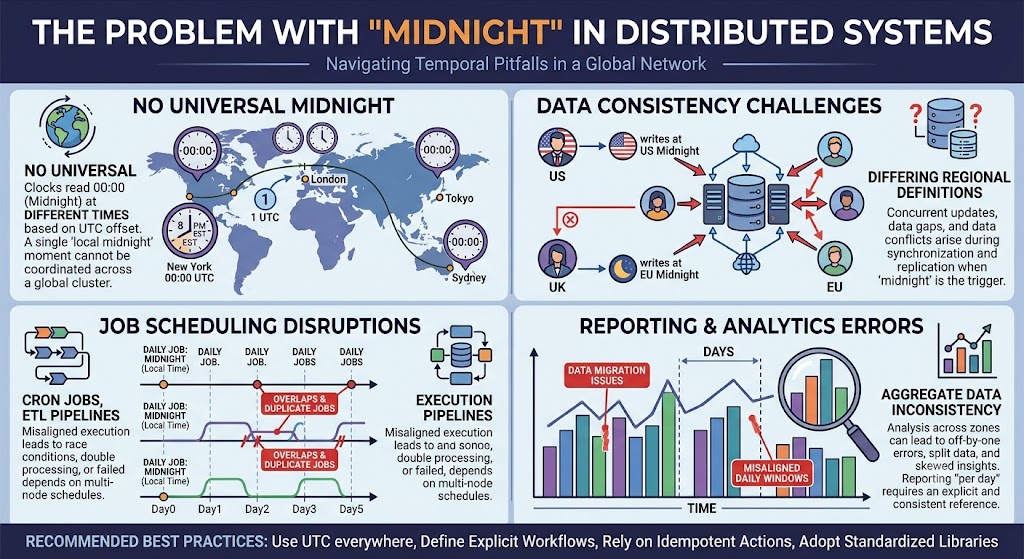
Midnight sounds simple. It is the boundary between one day and the next. But in distributed systems, midnight is a trap.
Which midnight? Whose midnight? In what time zone? Does it account for daylight saving? What happens when two servers disagree about what day it is?
These questions cause some of the most expensive and hardest-to-debug failures in production. This guide explains why midnight is dangerous and how to handle it correctly.
Use the free time zone converter here →
The Short Answer: Why Midnight Is Dangerous
Midnight is ambiguous because there is no single midnight. Every time zone has its own, and DST can make midnight disappear or repeat. Distributed systems that assume one midnight will eventually produce wrong dates, duplicate charges, or missing reports.
| Problem | Effect |
|---|---|
| Multiple midnights | 38+ distinct moments per day |
| DST transitions | Midnight can skip or repeat |
| Server disagreement | Different dates on different machines |
| User location | "Today" varies by person |
| Billing boundaries | Duplicate or missing charges |
| Report boundaries | Data in wrong period |
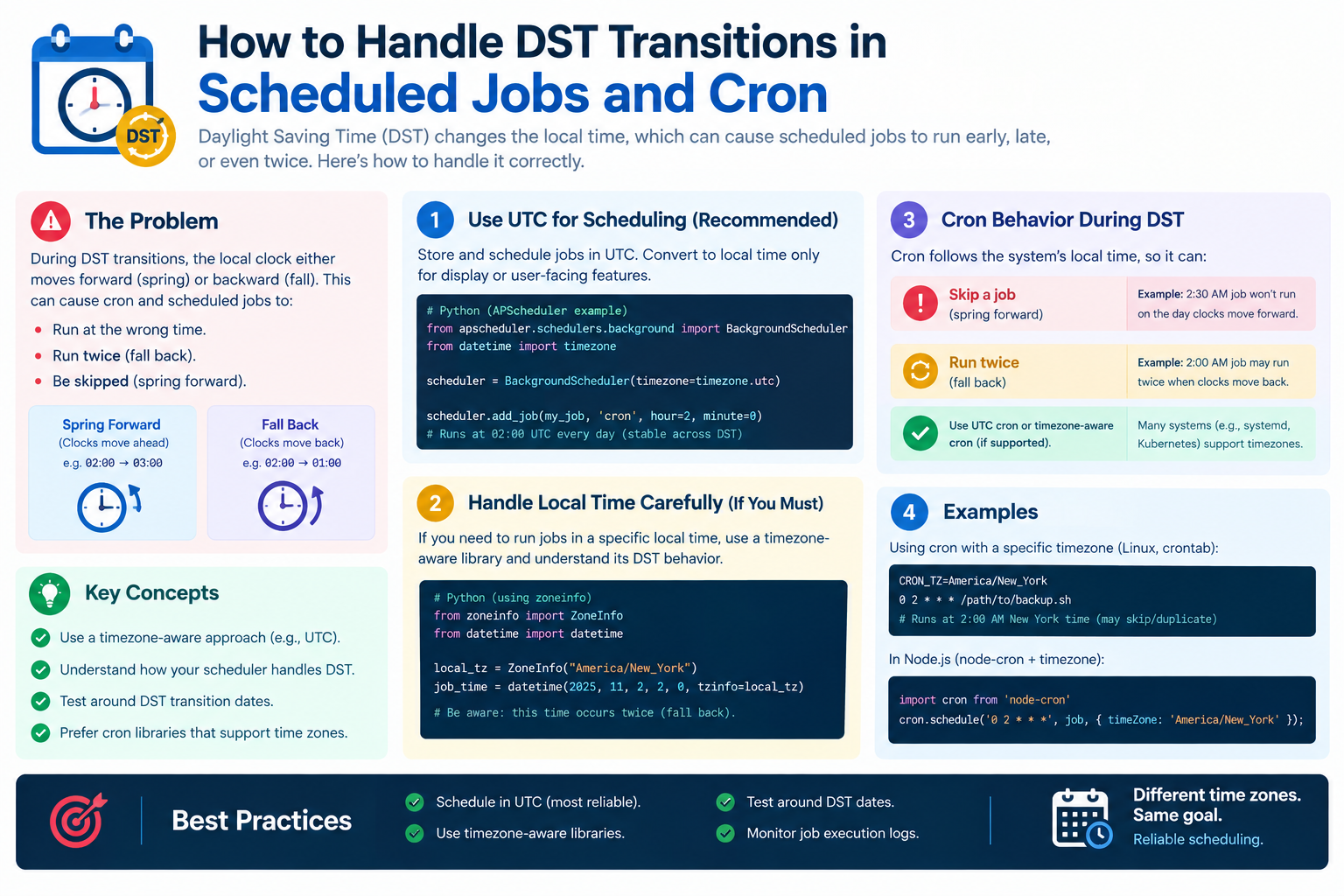
| Cron scheduling | Jobs skipped or duplicated |
There Is No Such Thing as Midnight
The 38 Midnights Problem
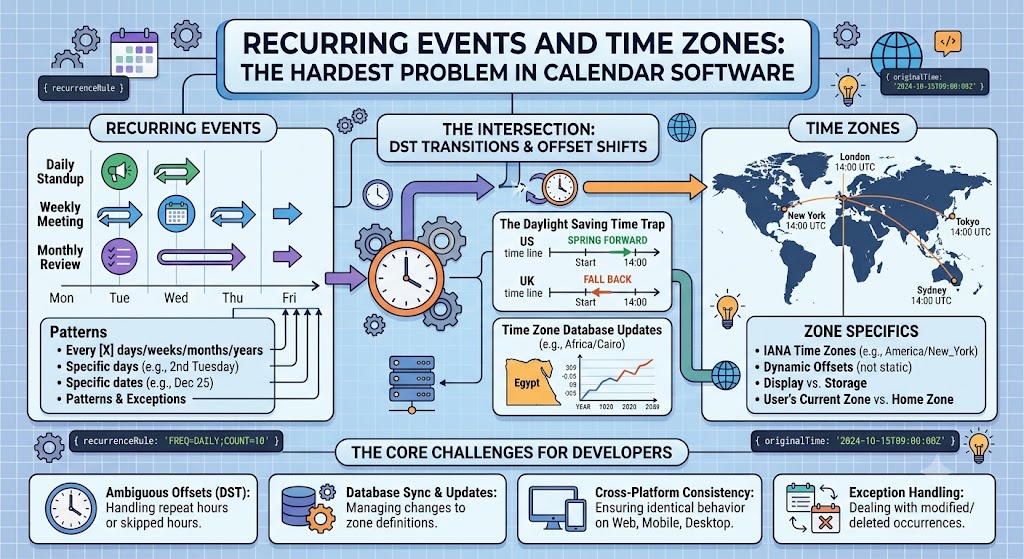
Earth has roughly 38 time zones in use today. Each has its own midnight. There are 38 distinct moments every day when some part of the world crosses into a new date.
| Time Zone | Midnight (UTC) |
|---|---|
| UTC+14:00 (Kiritimati) | 10:00 previous day |
| UTC+09:00 (Tokyo) | 15:00 previous day |
| UTC+05:30 (India) | 18:30 previous day |
| UTC+00:00 (London) | 00:00 |
| UTC−05:00 (New York) | 05:00 |
| UTC−08:00 (Los Angeles) | 08:00 |
| UTC−12:00 (Baker Island) | 12:00 |
What This Means
| Statement | Reality |
|---|---|
| "Today is September 22" | True in some zones, false in others |
| "The day ended" | Only in one specific zone |
| "Run the daily job" | Which day? Whose day? |
| "Reset the counter" | At what moment? |
When a system says "at midnight," it is almost always making a hidden assumption.
The Classic Billing Bug
How It Happens
A billing system charges customers at midnight UTC. But customers are spread across the world.
| Customer | Local Time at UTC Midnight |
|---|---|
| New York | 7:00 PM |
| London | 12:00 AM |
| India | 5:30 AM |
| Tokyo | 9:00 AM |
| Sydney | 10:00 AM |
A New York customer sees a charge on September 21 while the system records it as September 22.
The Duplicate Charge Bug
Worse: if two servers run the billing job, they may both charge the customer.
| Server | Time Zone | Runs At | Result |
|---|---|---|---|
| Server A | UTC | 00:00 UTC | Charges customer |
| Server B | US Eastern | 00:00 EST | Charges again |
| Customer | — | — | Charged twice |
Why It Is Hard to Catch
The bug only appears:
| Condition | Frequency |
|---|---|
| At midnight | Once per day |
| Across zones | Only for some users |
| During DST | Twice per year |
| Under load | When both servers run |
This is why midnight bugs survive testing and reach production.
DST Makes Midnight Worse
The Missing Midnight
In some regions, DST transitions happen at midnight. When clocks jump forward, midnight does not exist.
| Region | Transition | Missing Time |
|---|---|---|
| Brazil (historical) | Spring forward | 00:00–01:00 |
| Chile | Spring forward | 00:00–01:00 |
| Lebanon | Spring forward | 00:00–01:00 |
| Iran (historical) | Spring forward | 00:00–01:00 |
A job scheduled for midnight simply does not run.
The Repeated Midnight
When clocks fall back, midnight can happen twice.
| Region | Transition | Repeated Time |
|---|---|---|
| Chile | Fall back | 00:00–01:00 |
| Lebanon | Fall back | 00:00–01:00 |
A job scheduled for midnight may run twice.
The Off-By-One-Day Bug
Because many regions transition at 02:00 or 03:00, the date can roll over in unexpected ways.
| Scenario | Result |
|---|---|
| Job at 00:00 local | May skip or duplicate |
| Job at 23:59 local | May fall in wrong day |
| Date derived from time | Off by one |
The Date Rollover Race
The Problem
At midnight, the date changes. In a distributed system, different nodes may roll over at different times.
| Node | Time Zone | Rolls Over At |
|---|---|---|
| Node A | UTC | 00:00 UTC |
| Node B | US Eastern | 05:00 UTC |
| Node C | India | 18:30 UTC |
For up to 18 hours, these nodes disagree about what date it is.
What Goes Wrong
| Failure | Cause |
|---|---|
| Lost writes | Data written to wrong day |
| Duplicate reads | Same data read twice |
| Report mismatch | Totals differ across nodes |
| Cache inconsistency | Keys use different dates |
| Unique key collision | Same key in two days |
The Distributed Date Problem
| Question | Answer |
|---|---|
| What date is it? | Depends on the node |
| Which day's data? | Depends on the query |
| When does the day end? | Depends on the zone |
Real-World Midnight Failures
| System | Failure | Cause |
|---|---|---|
| Billing | Duplicate charges | Two midnights |
| Analytics | Missing day's data | DST skip |
| Backups | Overwritten files | Date collision |
| Reports | Wrong totals | Zone mismatch |
| Logs | Split across days | Server zones |
| Cache | Stale keys | Date rollover |
| Cron | Skipped jobs | Missing midnight |
| Subscriptions | Wrong renewal date | Off-by-one |
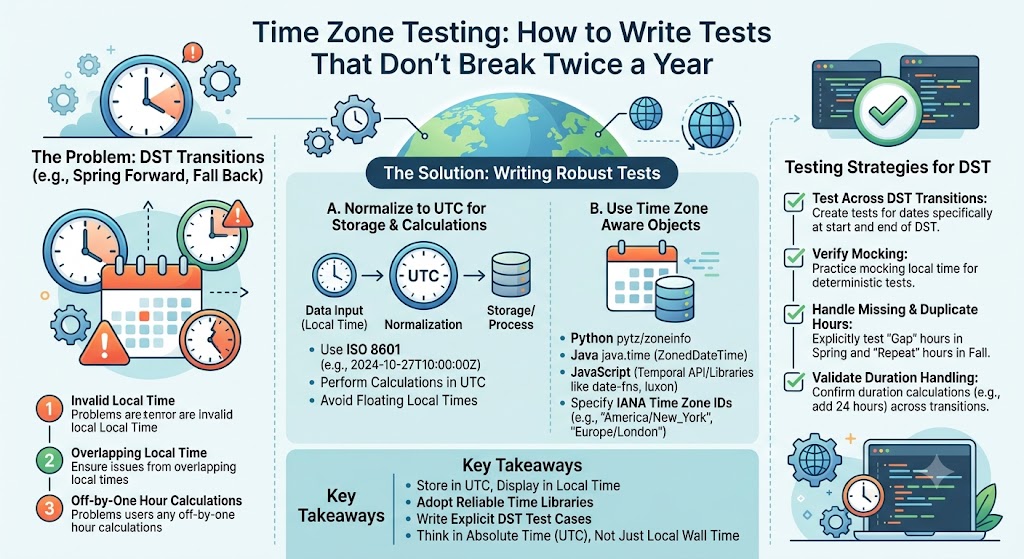
Solution 1: Use UTC Everywhere
The Principle
Store and process everything in UTC. Never use local midnight as a system boundary.
| Practice | Benefit |
|---|---|
| Store UTC | One reference |
| Process in UTC | Consistent |
| Compare in UTC | No ambiguity |
| Display in local | Only at the end |
Why UTC Works
UTC has no DST and no ambiguity. Midnight UTC is a single, well-defined moment.
| Aspect | UTC | Local |
|---|---|---|
| DST | None | Yes |
| Ambiguity | None | Yes |
| Multiple zones | No | Yes |
| Predictable | Yes | No |
The Trade-Off
| Benefit | Cost |
|---|---|
| Consistent | Users see "day" change at odd times |
| Simple | Requires explaining to stakeholders |
| Reliable | Business logic may need adjustment |
Solution 2: Define the Business Day Explicitly
What Is a Business Day?
A business day is a policy decision, not a technical one. Define it clearly.
| Question | Example Answer |
|---|---|
| What zone defines the day? | UTC |
| When does the day start? | 00:00 UTC |
| When does it end? | 23:59:59 UTC |
| What about DST? | Irrelevant in UTC |
| What about users? | Displayed in their zone |
Document the Policy
| Item | Value |
|---|---|
| Zone | UTC |
| Start | 00:00:00 UTC |
| End | 23:59:59.999 UTC |
| Boundary | Inclusive start, exclusive end |
| Owner | Finance team |
Why Documentation Matters
Ambiguity about the business day is the root cause of most midnight bugs. Once the policy is written and agreed, the technical implementation follows.
Solution 3: Use Half-Open Intervals
The Principle
Define date ranges as start inclusive, end exclusive.
| Interval | Meaning |
|---|---|
| [00:00, 24:00) | Full day |
| [start, end) | Standard convention |
| [00:00, 00:00 next day) | Clean boundary |
Why Half-Open Wins
| Benefit | Explanation |
|---|---|
| No overlap | Adjacent intervals do not double-count |
| No gaps | Every instant belongs to exactly one |
| Easy math | Duration = end − start |
| Standard | Used by databases and APIs |
Example Query
SELECT * FROM orders
WHERE created_at >= '2026-09-22T00:00:00Z'
  AND created_at <  '2026-09-23T00:00:00Z';
Note the < on the end. This avoids including midnight twice.
Solution 4: Avoid Scheduling at Midnight
The Simple Fix
If you must schedule a job, do not schedule it at midnight. Move it a few minutes later.
| Instead of | Use |
|---|---|
| 00:00 | 00:05 |
| 23:59 | 23:50 |
| Midnight local | 02:00 or 04:00 UTC |
Why This Works
| Benefit | Explanation |
|---|---|
| Avoids rollover | No race at the boundary |
| Avoids DST | Transitions happen at midnight |
| Avoids overlap | No duplicate execution |
| Easy to reason about | Clear separation |
Recommended Job Times
| Job Type | Recommended Time |
|---|---|
| Daily report | 02:00 UTC |
| Billing run | 03:00 UTC |
| Backup | 04:00 UTC |
| Cleanup | 05:00 UTC |
| Analytics rollup | 06:00 UTC |
Solution 5: Make Operations Idempotent
The Principle
Even with careful design, jobs may run twice. Make them idempotent so running twice causes no harm.
| Practice | Purpose |
|---|---|
| Check before acting | Skip if already done |
| Use unique keys | Prevent duplicates |
| Record completion | Track state |
| Use transactions | Atomic operations |
| Design for retries | Safe re-runs |
Example: Idempotent Billing
| Step | Action |
|---|---|
| 1 | Check if invoice exists for period |
| 2 | If yes, skip |
| 3 | If no, create invoice |
| 4 | Mark period as billed |
| 5 | Log completion |
The Idempotency Key
| Key | Example |
|---|---|
| Customer + period | cust_123 + 2026-09 |
| Order ID | order_456 |
| Job run ID | run_789 |
Use a unique constraint in the database to enforce it.
Solution 6: Store the Zone With the Date
The Principle
When you store a date, store the zone it belongs to.
| Storage | Example |
|---|---|
| Bad | 2026-09-22 |
| Good | 2026-09-22 (UTC) |
| Good | 2026-09-22 (America/New_York) |
| Good | 2026-09-22T00:00:00Z |
Why This Helps
| Benefit | Explanation |
|---|---|
| No ambiguity | Zone is explicit |
| Correct conversion | Later displays are accurate |
| Audit trail | Can reconstruct intent |
| Debugging | No guessing |
Where to Store It
| Location | Example |
|---|---|
| Database column | date, zone |
| API response | { "date": "2026-09-22", "zone": "UTC" } |
| Logs | 2026-09-22T00:00:00Z |
| Reports | Header note |
Quick Reference Card
━━━━━━━━━━━━━━━━━━━━━━━━━━━━━━━━━━━━━━━━━━━━━━━━━━━━━━━━━━
   MIDNIGHT IN DISTRIBUTED SYSTEMS — CHEAT SHEET
━━━━━━━━━━━━━━━━━━━━━━━━━━━━━━━━━━━━━━━━━━━━━━━━━━━━━━━━━━

THE CORE PROBLEM:
  There is no single midnight
  38+ time zones = 38+ midnights per day
  DST can make midnight skip or repeat

WHAT GOES WRONG:
  • Duplicate charges
  • Missing reports
  • Off-by-one dates
  • Cache inconsistencies
  • Lost writes
  • Skipped or duplicated jobs

SIX SOLUTIONS:
  1. Use UTC everywhere
  2. Define the business day explicitly
  3. Use half-open intervals [start, end)
  4. Avoid scheduling at midnight
  5. Make operations idempotent
  6. Store the zone with the date

HALF-OPEN INTERVAL:
  WHERE created_at >= '2026-09-22T00:00:00Z'
    AND created_at <  '2026-09-23T00:00:00Z'

RECOMMENDED JOB TIMES (UTC):
  Daily report    → 02:00
  Billing run     → 03:00
  Backup          → 04:00
  Cleanup         → 05:00
  Analytics       → 06:00

IDEMPOTENCY KEY:
  customer_id + period  → unique constraint

STORE THE ZONE:
  { "date": "2026-09-22", "zone": "UTC" }

GOLDEN RULE:
  UTC for storage. Half-open intervals. Idempotent jobs.

━━━━━━━━━━━━━━━━━━━━━━━━━━━━━━━━━━━━━━━━━━━━━━━━━━━━━━━━━━
         Check live conversions at: /timezone-converter
━━━━━━━━━━━━━━━━━━━━━━━━━━━━━━━━━━━━━━━━━━━━━━━━━━━━━━━━━━
Frequently Asked Questions
Why is midnight a problem in distributed systems?
There is no single midnight. Every time zone has its own, DST can make midnight skip or repeat, and different servers may disagree about what date it is.
How many midnights happen per day?
There are roughly 38 time zones in use, so there are about 38 distinct moments each day when some part of the world crosses into a new date.
What is the classic billing bug at midnight?
A billing system runs at midnight UTC, but customers in different zones see charges on different dates. If two servers run the job in different zones, customers can be charged twice.
Can midnight disappear during DST?
Yes. In some regions, DST transitions happen at midnight, so the 00:00 hour does not exist. Jobs scheduled for midnight may not run.
Can midnight happen twice during DST?
Yes. In some regions, clocks fall back at midnight, so the 00:00 hour repeats. Jobs scheduled for midnight may run twice.
What is the best time zone for scheduled jobs?
UTC. It has no DST and no ambiguity. Avoid scheduling at exactly midnight; use 02:00–06:00 UTC instead.
What is a half-open interval?
A half-open interval includes the start and excludes the end: [start, end). This avoids double-counting the boundary and is the standard convention for date ranges.
How do I define a business day?
Explicitly. Choose a zone (usually UTC), a start time (00:00), and an end time (24:00). Document it and apply it consistently.
What does idempotent mean?
An idempotent operation produces the same result whether run once or multiple times. Use unique keys and check-before-act patterns.
Why store the zone with the date?
Storing the zone removes ambiguity, enables correct conversion later, and provides an audit trail for debugging.
What is the single most important fix?
Use UTC for storage and processing. Display in local time only at the very end. This eliminates most midnight bugs.
Final Thoughts
Midnight is a human concept, not a technical one. It marks a boundary that varies by location, shifts with DST, and creates races in distributed systems. Treating midnight as a fixed moment is one of the most common and most expensive mistakes in software.
The fix is not complicated. Use UTC. Define your business day explicitly. Use half-open intervals. Avoid scheduling at midnight. Make jobs idempotent. Store the zone with the date.
Three things to remember:
- There is no single midnight. Every zone has its own
- UTC is the safe default. No DST, no ambiguity
- Define and document the business day. Never assume it
Check time zone conversions instantly → /timezone-converter
Tags: midnight problem distributed systems, midnight time zone bug, date rollover distributed systems, end of day billing bug, DST midnight ambiguity, UTC midnight vs local midnight, midnight in cron jobs, date boundary distributed systems, time zone converter, midnight software bug